My post title is adapted from a Cheers episode. A classic Norm quote from season 8 was, “Women. You can’t live with them…pass the beer nuts.” Somehow I find it quite fitting with respect to our move to Costa Rica. I can’t imagine making the move without technology but, at the same time, it has been the source of “muy” frustration. I spent countless hours prior to our move researching various technologies related primarily to televisión, teléfono and música. Some of the research payed off. Some did not.
Televisión
Having access to the comforts of home with respect to television was one of my top priorities. Not that we watch an inordinate amount of TV but I wanted to be able to enjoy my favorite shows in English and in high definition. The photo below shows our main home entertainment area from the front and behind the scenes.
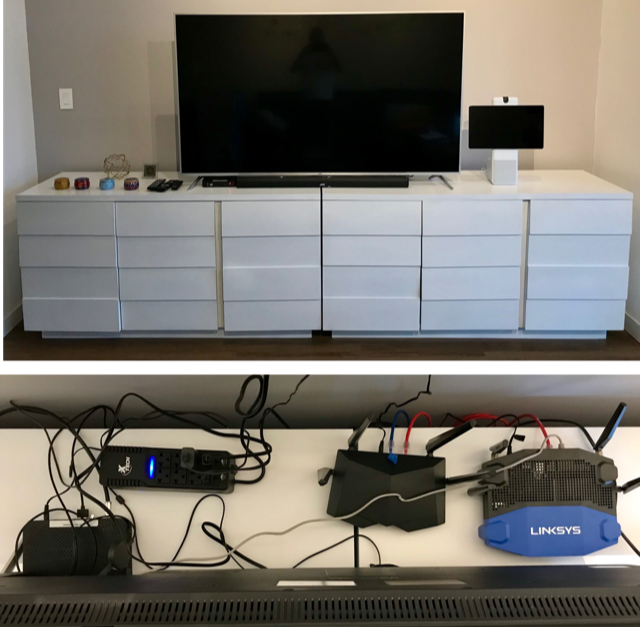
Our television setup includes the following:
- 65″ JVC Television (you may remember the post about its purchase…)
- JVC Soundbar
- Internet Connection in Wall
- Two (2) Routers
- Cable Box
- Chromecast Stick with HDMI (to T.V.) and USB (to power) connections
Cable TV
Our apartment complex offers one choice in cable TV / internet providers – Blue Sat. After some deliberation we decided to go with Blue Sat. I was given contact information for a man named Wilfredo at Blue Sat. I began corresponding with him several weeks before we were to take possession of our apartment. Wilfredo provided me with a quote for services and a list of channels.
We opted to go with the Digital Diamond package for $70 per month. The Digital Diamond package seemed to be the best fit since it was the only package offered. We were also required to pay $10 per month for an analog telephone line which they also describe as “fixed telephone line IP”. “IP” makes me think it is a digital, not analog, service but it doesn’t really matter since they provided no phone, no information about how to use it and have not responded to my questions about it.
The Digital Diamond service claims to include more than 275 channels which seems to nearly match the number of channels included on the channel list provided. The service did include 10 HBO variations and 7 Fox Premium channels including Fox Premium Series, Comedy, Movies, Classics, Family, Action and Cinema. We have yet to explore these options to see if there is any value. Wilfredo assured me that virtually all channels were available in both Spanish and English, a claim I would question shortly after signing our one year service contract (in Spanish). Actually, Cindy signed the contract since John was engaged elsewhere (see below), after assuring Wilfredo that it was OK for her to do so.
Wilfredo and a technician showed up to do the installation on July 5th, the last day of our short July trip, based on our request to do so earlier that morning. Unfortunately we were double booked at that time so while I was stuck at the bank with our attorney, Cindy had to coordinate the cable TV installation. We were provided with no instructions and no contact information in case we ever have a problem. We were provided with the bank account information for Blue Sat so we could coordinate payments. The first payment, as Cindy found out, was due before close of business on the day of the installation. The installation was completed at 3:30 pm. Cindy had until 4:00 pm to find their bank, Promerica, and make our payment. Luckily their bank was nearby and Cindy was able to negotiate the transaction with the assistance from someone at Promerica bank that spoke some English. (From Cindy – this turned out to be the easiest banking transaction to-date.)
We were highly disappointed when we tested the cable TV that night and could only find a handful (maybe 5-10 channels) that seemed to be in English. At least one of them was HGTV (one of my favorites) but unfortunately it was not one of the high definition channels. Once I was through cursing Wilfredo’s misleading sales tactics we decided we would need to supplement with a streaming service of some sort. I had anticipated that anyway and had already done research on various available services. More on that later.
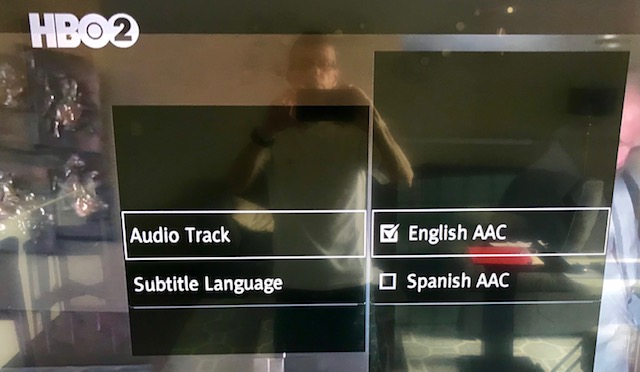
I am embarrassed to admit that only yesterday, three weeks after moving in, as part of my prep work to write this blog entry I made a discovery. After printing the channel list I noticed a number of channels, 81 to be exact, had a black circle beside the which matched a key at the bottom of the page indicating “SAP / Audio Secundario.” On a flier I booted up the TV, navigated to one of those channels, found a key on the remote labeled “audio” and pressed it to unveil the menu shown below. Apparently, on a channel-by-channel basis, you can select the audio language and, in some cases, the language for subtitles. Eureka!
I have stopped cursing Wilfredo for misleading me about the availability of English channels and now only curse him for not providing any operational guidance and for no longer responding to my emails. Another expat living in the building described Wilfredo as “worthless.” I concur.
The Blue Sat channel list included ABC and CBS but not NBC. The delivered product only included CBS and it is from a Miami, Florida affiliate that preempts regularly scheduled programming for Miami Dolphin games! For this and other reasons we decided we would need to supplement with a U.S.based streaming service.
Internet Service
Like cable TV, internet service in our apartment complex is only provided by Blue Sat. They offered us four monthly options as follows: 10 mbps for $38; 30 mbps for $114; 40 mbps for $140 and 50 mbps for $165. The service is symmetric meaning upload and download speeds are the same. In the U.S. upload speeds are typically much reduced in comparison to download speeds. The terms also disclose an oversubscription ratio of 1:10 meaning you may be sharing your bandwidth with as many as 10 other subscribers. I suspect this is similar to practices in the U.S. although I’m not sure service providers are as transparent with that information in the States. They also do not provide a router but do configure it as part of their installation service ($15).
Because we anticipate much streaming and internet use we decided to splurge and go with the 50 mbps service for the year or so we will be in Escazú. I have tested our internet speed a few times and it came in at about 30 mbps each time, an acceptable speed given the oversubscription ratio. Occasionally our streaming service will freeze but generally just for a few seconds.
Streaming Services
Before the move I fully expected that we would need to subscribe to at least one streaming service. I looked at a number of options and we eventually decided YouTube TV was most compatible with our viewing habits. YouTube TV costs $50 per month and provides 70+ channels of live TV including local network affiliates based on your declared home viewing area. In order to display YouTube TV on our television we had to purchase a Google Chromecast stick, more on that later.
I was elated to see HGTV in the familiar glory of high definition (in contrast to the low def version available through Blue Sat). It appeared that YouTube TV might be the answer to our prayers and perhaps our investment in Blue Sat cable service was unnecessary. I would soon discover a flaw in our execution, however.
We declared our home viewing area to be Des Moines, Iowa in hopes of receiving the network broadcasts through our familiar local affiliates WHO, KCCI and WOI. As it turns out YouTube TV requires that you periodically verify your home viewing area through the GPS on your smart phone. Unfortunately, our smart phones are with us in Costa Rica. We added our son Andy to our service thinking that, since he is in Des Moines, he could verify the home viewing area for the account. That too failed since he was only able to verify the home viewing area for himself, i.e. it is established on a per household user basis. Cindy and I plan to verify our home viewing area when we return to Iowa for the holidays. In the meantime we are unable to watch network TV for the four major networks and also are prevented from recording shows. Lesson learned: we should have signed up for the service before leaving the States and could then have established our home viewing area. I’m not certain how frequently we will have to re-verify our home viewing area. Hopefully, twice per year will suffice in accordance with out planned trips back to Iowa.
One thing I failed to mention with respect to U.S.-based streaming services is that they are not available outside the U.S. I imagine that has more do to with legal jurisdictions rather than technology limitations. Supposedly, you can get around this restriction by employing a VPN (virtual private network) service with a server within the U.S. This brings me to my text topics.
VPN Service
Based on my research prior to our move I concluded that we should purchase a VPN service both for security and to maintain an IP address within the U.S. We selected ExpressVPN because it seemed to be one of the more popular services, it seemed to get high marks and cost just at $100 per year. We also needed to get our own router that would support ExpressVPN. We purchased one of the higher end routers they suggested and had it pre-configured for ExpressVPN. The high end Linksys router cost approximately $250 pre-configured and delivered to us in South Carolina prior to our move.
The apartment owner provided a router and television that were already set up for the local cable service, Blue Sat. We connected our router to that router so we now have two separate wireless networks within the apartment – one that appears to be in Costa Rica and one that appears to be in the U.S. By establishing the VPN on our router rather than on a computer we are able to protect all connected devices with VPN service.
We have been very happy with the support provided by ExpressVPN. Unfortunately, we discovered that Amazon Prime is smart enough to detect that you are using a VPN service and will not allow you to connect through it. We therefore are unable to watch Amazon Prime.
Google Chromecast
In order to watch YouTube TV on our big screen TV we discovered that we needed to acquire a supported casting device, e.g. Google Chromecast. “Casting” was not a term in my vocabulary but it certainly is now. We were able to purchase a Chromecast stick at the Radio Shack in the local Multi-Plaza (giant mall chain in Central America). As I recall it cost $50 or $60 dollars. It has a USB connection for power and an HDMI connection to the TV. It is a small circular device that communicates with a smart phone. An app installed on our smart phones serves as a remote control and user interface. In addition to YouTube TV we can also cast Netflix to our television with Chromecast. There are probably other apps that support casting as well.
I now refer to our living room sectional as my “casting” couch. Another resident in our apartment complex has since told me about another streaming service called Genzee TV. It sounds perhaps better and cheaper than YouTube TV but requires an Amazon Firestick rather than a Google Chromecast stick. The other apartment resident, I shall call him “nameless Joe,” was uncertain about the legality of Genzee TV but was very happy with its performance. Unfortunately, Radio Shack does not sell Amazon Firesticks. We will either need to get once next time we return to the U.S. or try to order one from Amazon once we confirm that our initial test order, two Killerspin ping-pong paddles, successfully complete their 3 1/2 week journey to our apartment in Esaczú.
Television Set
From day one of acquiring our apartment in Escazú I have contended that the 50″ Sharp T.V. provided by the apartment owner was too small for the viewing distance from the couch (12 feet) and was not proportionate to the size of the room. Cindy, on the other hand, contended that a 50″ TV could be seen in perfect detail from the international space station. After some web surfing I found a site that corroborated my claim that 12 feet was a fine viewing distance for a 65″ TV I added to my argument the fact that a 65″ inch T.V. would hide the cable and electrical outlets on the wall and would free up a 50″ TV for bedroom viewing. Cindy chose to let me win the battle over 15 inches of diagonal viewing turf and would strategically file this concession away for future reference. The ensuing trip to PriceSmart to acquire the 65″ behemoth would become the topic for another blog post already posted by Cindy.
PriceSmart offered two choices in 65″ monstrosities – a Samsung for $1,200+ and a JVC for approximately $850. Both were smart T.V.s. While my original intention was to go with a reliable Samsung, I was feeling ever-so guilty about spending that much money when there was a much cheaper option available. Being inherently cheap by nature, “pinche” as the Ticos would call me, I decided to go with the JVC, a decision I now regret. (From Cindy – don’t think I was the reason for the less expensive purchase. I thought the Samsung might have looked a tad bit better and even said so at the time of purchase.)
After purchasing, having delivered and installing the big JVC, I soon discovered one of its main flaws. It was a “smart” TV but, unlike the Samsung, turned out to be “on the spectrum.” I didn’t really know that there could be huge differences in the apps available on smart TVs. The JVC had very limited apps, did not include a web browser and did not support YouTube TV thus necessitating the need for Google Chromecast as previously described. Also, after some internet research, I discovered JVC would not be introducing a new apps and may not be maintaining the existing smart TV apps it provides.
On a brighter note, the 50″ TV in our bedroom is magnificent!
Teléfono
Proving every bit as vexing as television technology, telephony has stymied me ever since the breakup of At&T. Cellular “smellular”, give me a solid Northwestern Bell-built analog telephone and a wall to mount it on any day. Not unlike the aforementioned breakup of AT&T, our move to Costa Rica would necessitate the breakup of our longstanding Verizon family plan for four.
kölbi ICE, Take One (Abject Failure)
All the research I did with respect to having cellular voice and data service in Costa Rica yielded the same result. We would need to purchase SIM cards in Costa Rica for our smart phones and thereby acquire Costa Rican telephone numbers. During our initial pre-move trip I planned to purchase a SIM card upon landing at the San Jose airport and test it during our short 3 day trip. According to plan, I purchased a SIM card at the airport with 2 GB of data for $10 immediately after purchasing duty free wine.
Costa Rica has three main cell phone carriers – kölbi ICE, Claro and Movistar. All three are private companies but formerly there was a single, government-owned service from ICE (Instituto Costarricense de Electricidad). The government program morphed into kölbi ICE and is the only service you can purchase at the San Jose airport kiosk near baggage claim.
Being in a hurry to get to our newly acquired “apartamento” I neglected to have the man at the kölbi ICE booth install the SIM card for me. I know that young travelers worldwide could flip a SIM card chip blindfolded in a matter of seconds so I had no doubt I could easily do the same from the comfort of our apartment. The credit card-sized SIM card holder had two numbers printed on it – a 4-digit PIN and an 8-digit PUK. From all my research I knew that Costa Rican telephone numbers had a country code of +506 plus 8 digits. I logically concluded that the PUK number was my telephone number. Did I mention I am a numbers guy and a math major in college?
Our 3-day trip had a very aggressive agenda. We needed to meet our landlord and take ownership of our apartment, meet with our attorney in connection to our residency application, meet with ARCR to review health insurance options, begin to set up our apartment, etc. Rather than take the time to install my new SIM card I opted to utilize our current Verizon plan with unlimited data in Costa Rica for $10 per day. The Verizon service worked well enough to summon Uber drivers, display maps and perform an occasional Google search. During our busy itinerary I had multiple occasions to proudly provide my new Costa Rican telephone number to various interested parties including the bank, the apartment building management and the San Jose police depart when we registered as part of our residency application.
At one point we had a few minutes at the apartment so I decided to test my new kölbi SIM card. As it turns out, I am as adept at installing a microscopic SIM card as I was as a child surgeon playing the game Operation – not in the least. After fumbling with the chip and retrieving it from the floor on at least one occasion it was finally installed. (From Cindy – Notice it wasn’t mentioned who finally got the chip installed correctly?) I was able to connect to the internet and therefore claimed victory. What we neglected to do was prove that my phone actually worked as a phone, i.e. could make and/or receive calls. I reinstalled my Verizon SIM to save data on my kölbi card.
Back in the San Jose airport we were preparing for our departure back to South Carolina when I decided to reinstall and test out my kölbi SIM card for telephone calls. I gave Cindy my telephone number and she attempted to call me from her Verizon phone. No luck! After multiple failed attempts and two calls to kölbi customer service complete with 20 minute wait times each, we discovered that the PUK was not my telephone number. At the airport they failed to provide me with my telephone number when I purchased the card. Even with my PIN and my PUK, customer service could not tell me what my number was. Without my number I could never reload my card or “top it off” in cellular vernacular. Now, I wanted to “PUK.” I had spent much of the previous three days providing a fictitious telephone number to various authorities including my bank and the San Jose police department.
The test was an abject failure. We would have to repeat the entire exercise upon our next trip and final move to Costa Rica. There was no longer any room for error. My confidence was shaken and the enigma of maintaining cell service in a foreign country was back on my long list of insurmountable tasks to be concerned about.
Google Voice
Although our first kölbi ICE experiment was a debacle, I’m please to report that Google Voice went off without a hitch and was a great success. While not intended for international use, Google Voice provides two very significant features.
- The ability to port your current cell number to Google Voice and retain it as a precaution for anyone that may try to call or text you at that number.
- The ability to make telephone calls to the U.S. using VOIP on a computer and have those calls appear to be coming from your U.S. cell phone number (the one ported to Google Voice in number 1).
The cost to port a cell number from a U.S. carrier to Google Voice is $20, a one-time charge. There are no ongoing to charges to use the service.
If friends in the U.S. call my U.S. cell number they will receive a message saying “Google Voice is trying to locate me.” They are prompted to announce their name. If I am on my computer, Google Voice will allow me to answer the call. If not, it will prompt the caller to leave a voice message that I can later retrieve.
If friends in the U.S. send me a text message to my U.S. cell number, it will get delivered to me through Google Voice or Google Hangouts. It will not be delivered through my cell phone’s messaging app but that’s no big deal.
We have had numerous occasions necessitating making or receiving calls from the U.S. and, with only an occasional hiccup if our internet burps, the service works extremely well. As an added bonus, if we ever move back to the States we can port our cell number from Google Voice to another U.S. cell carrier.
kölbi ICE, Take Two
Upon arriving at the San Jose airport during our final move to Costa Rica, we tried our luck again at the Kölbi ICE kiosk. This time we purchase two SIM cards and let them install them in our iPhones. This time they wrote our assigned telephone numbers in bold permanent marker on the SIM chip packaging, no confusing the phone number with the PIN and the PUK (whatever the hell a PUK is). This time both data and voice options worked without a hitch… or at least on my phone.
Apparently, sometime during the taxi ride from the airport to our apartment, demons took possession of Cindy’s phone, consumed all 2 GB of her data seemingly across every installed app on her phone and somehow locked her SIM card. We would soon be making a one-mile or so Saturday morning trek to a kölbi ICE store to unlock her SIM card and reload it with more data. We practiced the phrase, “Recargar mi kölbi,” during the long trek. As we would discover, mostly through body language and pointing, Cindy can unlock her SIM card herself using the provided PIN and the settings menu on her iPhone. Apparently demons still possess her phone because her SIM card gets locked every time she powers off her phone.
Cindy is now so paranoid about demons consuming her data that she has disabled virtually every app on her phone from using roaming data and, as a level-two defense, almost always disables cellar data in its entirety. (From Cindy – yes, I can easily unlock my phone now, but we have yet to figure out how to top off our accounts. One can’t be too careful!)
Total Wireless
Because we ported our U.S. cell numbers to Google Voice and because we supposedly had to do so a few days prior to leaving the U.S. (for verification purposes) we were left without cell service during our last few days in South Carolina. Also, we knew we were going to need cell (mostly data) service when we come back to the States to visit. For these reasons, we purchased prepaid SIM cards at the Walmart in SC for Total Wireless. Total Wireless offers options for a fixed amount of data over a fixed time period. For example, a 30-day plan with 5 GB of data costs $35. Total Wireless runs on the Verizon network so coverage is good.
We each purchased a Total Wireless SIM card at Walmart in SC. The SIM cards were fairly cheap, perhaps $10 each. We each also purchased a 30-day service plan. Each SIM card comes with a U.S. phone number that is assigned upon activation. If you keep your plan active by renewing before it expires you are guaranteed to keep the number assigned. We are letting our plans lapse and will re-activate on our next trip to the States over the holidays. There is a chance we will be assigned new numbers when we reactivate but that doesn’t matter to us. We are not providing those numbers to anyone.
As I recall, activating Total Wireless wasn’t horrible but also wasn’t as straightforward as it could have been. The process failed for both of us when we tried to activate online. We both had to call the customer support number for activation. Cindy did so with the help of an agent and I did so through an IVR system.
Música
In the States we listened to Sirius XM in our vehicles and generally listened to Apple Music within our house and apartment. I didn’t want to lose that connection to home and an important part of my life. Although we sold all of our vehicles and canceled the associated Sirius XM subscriptions, we are still paying for one subscription for our son’s vehicle in Des Moines. As part of its new program Sirius XM now offers free streaming on your phone via their app with a paid vehicle subscription. Our son still gets the benefit of Sirius XM in his car while we take advantage of the associated free streaming service and can do so from here in Costa Rica. I’m hoping we may be able to stream within our vehicle when we do buy a car here since there are no satellite radio services (to my knowledge) in Costa Rica.
When playing music on our sound bar it sounded a little garbled at times. At first I suspected it to be an internet band width issue but it was actually a blue tooth issue, probably with the cheap sound bar I purchased (“pinche” John). Connecting my phone to the sound bar via my iPhone audio cable works fine.
Cindy and I love to play ping-pong and the ping-pong room in our complex is just two doors down from us. We also love to listen to music when we play. Unfortunately, we can’t connect to our router from there so streaming music through our cell phone service is the only option. We purchased a small external speaker for improved sound. I was concerned about consuming all my cell data in this way so we ran a test measuring my data usage before and after an hour of ping-pong play and music streaming. As it turns out, we consume about 55 MB of data per hour of music streaming. Based on the $8 for 2 GB cost of data that I purchased at the airport, our music cost is $.25 per hour of ping-pong play, the equivalent of 3 jukebox selections at the local Pizza Hut restaurant in Ankeny, Iowa circa 1974. As “pinche” as I am, this seems like a luxury we can afford.
In addition to Sirius XM we still maintain our family subscription to Apple Music. It provides a nice alternative to Sirius XM. We listen to Apple radio but can also play virtually any song on demand or download to my phone.
Summary
Technology keeps us contacted to friends and family in the States and lets us enjoy most of the creature comforts of home we have grown accustomed to from an entertainment perspective. Clearly we’ve taken some wrong turns along the way but it’s all part of the adventure. (From Cindy – HUH? John’s attitude about the wrong turns is certainly sugar-coated here. Having lived with him through all of this, he’s neglected to post all of his cursing, discouraged attitude, etc., which we call much “wailing and gnashing of teeth.”)
I intentionally didn’t talk about our use of Facebook Portal, which we use for face-to-face chatting with our family members. This will be a future post, most likely from Cindy.
I apologize for the length of this post but it is proportionate to the effort invested in the technology aspect of our move and our daily lives. If you are still reading this, thanks for sticking it out to the bitter end and… pass the beer nuts.
 Remember, it's an adventure.
Wow. Sounds like quite the ordeal. But I’m guessing a lesser person would have thrown up their hands in failure and headed back to the U.S. by now. To quote Chief Dan George “ we endeavor to persevere.” What doesn’t kill you makes you increase your alcohol intake. 😎👍
LikeLike
Just curious …. do you have a mailing address? I will investigate postage at this end.
You wore us out John!!! I would be in tears at least once for every episode.
Cindy, I-completely understand your role of stepping in to fix things!
However, if pressing the red button on the satellite box doesn’t fix it, I an in trouble!
MS&B
Sent from my iPhone
LikeLike